
Meetup Leaderboards
Meetup leaderboards let you rank a group of attendees by the points they earn on free Bites. They're built for live events — meetups, workshops, classrooms — where you want a scoreboard you can put on screen and share with a link, no accounts or logins required to view.
This is separate from the global Leaderboard and team leaderboards, which rank everyone by their all-time score across every Bite (free and premium). A meetup leaderboard only counts free Bites, so anyone can compete without a subscription.
Creating a Board
Log in and go to /accounts/meetup-leaderboard/new/. Fill in:
- Name — shown at the top of the board (e.g. "PyLadies Lisbon — Sept").
- Handles — the attendees' Pybites usernames, one per line or comma-separated (up to 50). Every handle must match an existing Pybites account; the form rejects any that don't so you catch typos before sharing.
- Start / end time (optional but recommended for live events) — a contest window. Only Bites first solved between these times count. Leave both blank to rank all-time free-Bite scores. Times are read in your own timezone.
Set a window for a fair contest. Without one, the board counts all-time free-Bite points, so attendees who already worked through the free Bites before your event start with a lead. With a window, only Bites first solved inside it count — everyone starts from zero. A subscription gives no edge either way: only free Bites are ever scored, for every attendee.
On save you get a shareable link. Send it to your attendees or drop it on the projector.
Sharing and Viewing
Each board lives at an unguessable URL (a random hash), for example /accounts/meetup-leaderboard/<hash>/. Anyone with the link can view it — no login needed — but the link can't be guessed, so it's effectively private to the people you share it with.
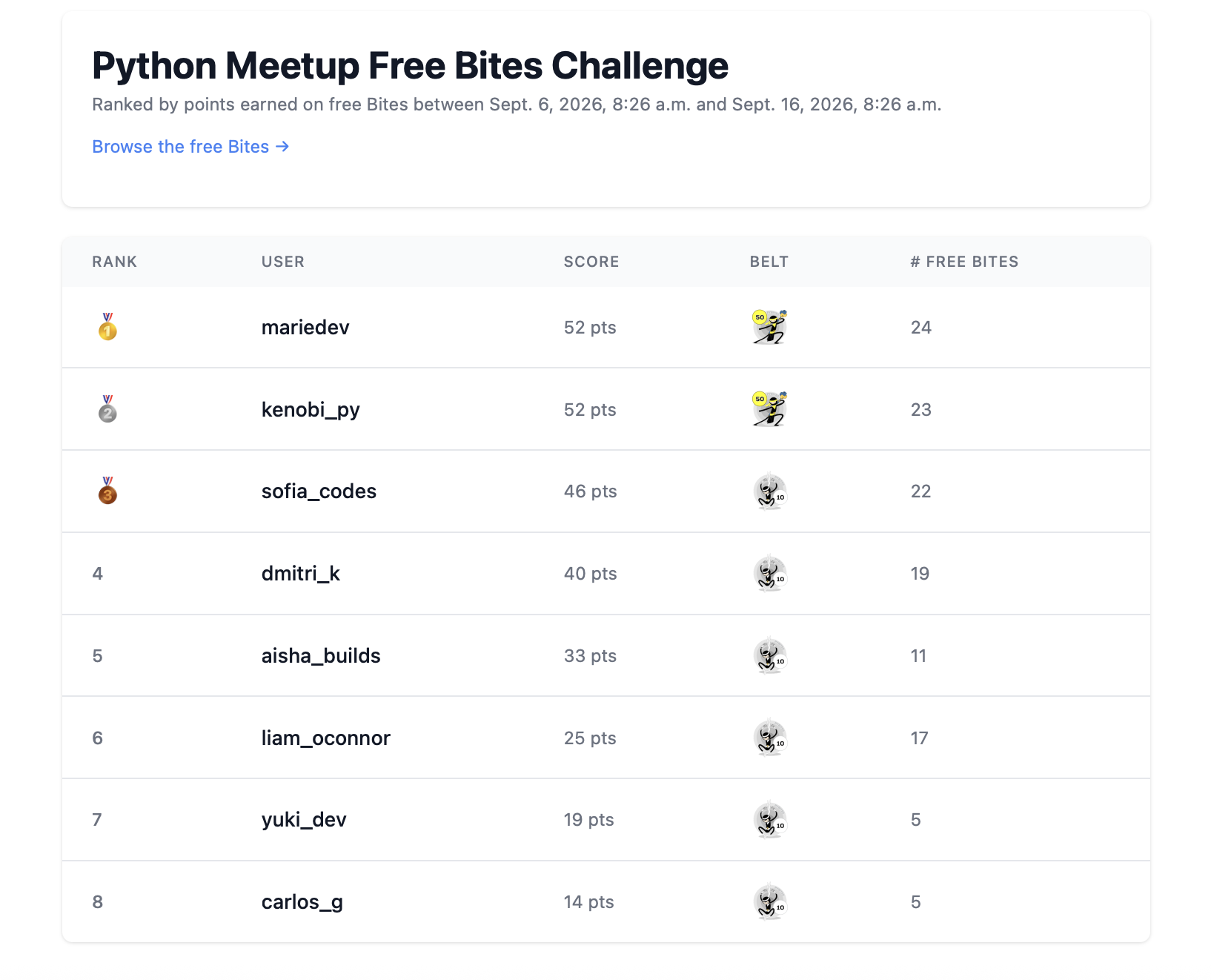
The board ranks each handle by score (highest first) and shows their belt level and number of free Bites solved. It refreshes itself every few seconds during the event, so you can leave it on the projector and watch scores climb as people submit solutions — no reloading needed.
How Scoring Works
For each listed attendee, the score is the sum of effective_score over the free, published Bites they've solved (a Bite counts once it's first completed). If you set a time window, only Bites first solved inside that window are counted — so the same board can host a fresh contest each event by editing the dates.
Attendees who haven't solved any qualifying Bites still appear, with a score of 0.
Point attendees at the free Bites so they know exactly which exercises count toward the board.
Editing and Finding Your Boards
Your saved boards are listed on your profile with view and edit links, so you never need to bookmark the share URL. Only you (the organizer) can edit a board — open it and change the name, handles, or contest window at any time. Editing the start/end dates is the easy way to reuse one board across multiple meetups.